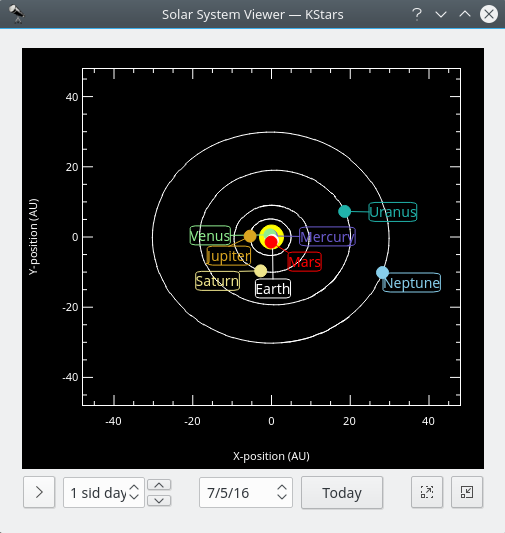
L'afficheur du système solaire
Cet outil affiche un modèle de notre système solaire vu de dessus. Le Soleil est dessiné comme un point jaune au centre du diagramme, et les orbites des planètes sont dessinées comme des ellipses avec les formes et orientations correctes. La position courante de chaque planète sur son orbite est dessinée comme un point coloré à côté de son nom. L'affichage peut être zoomé dans les deux sens avec les touches + et -, et l'affichage peut être recentré avec les touches fléchées, ou en double-cliquant n'importe où dans la fenêtre avec la souris. Vous pouvez aussi centrer sur une planète avec les touches 0–9 (0 est le Soleil ; 9 est Pluton). Si vous centrez sur une planète, elle sera suivie au fur et à mesure que le temps s'écoule dans l'outil.
L'afficheur du système solaire possède sa propre horloge, indépendante de l'horloge de la fenêtre principale de KStars. Il y a ici un composant graphique de contrôle de vitesse du temps semblable à celui de la fenêtre principale. Cependant sa valeur par défaut est de 1 jour (ainsi, le mouvement des planètes est visible) et il commence lorsque l'horloge est en pause à l'ouverture de l'outil. Vous pouvez définir la date comme celle du jour en appuyant sur le bouton
Aujourd'hui.Note
Le modèle actuel utilisé pour l'orbite de Pluton est bon seulement pour les dates comprises dans une fourchette de 100 ans autour de la date actuelle. Si vous laissez l'horloge du système solaire avancer au-delà de cette plage, vous verrez Pluton se comporter bizarrement ! Nous connaissons ce problème, et essayerons d'améliorer le modèle de l'orbite de Pluton bientôt.